Board course 01 — Finding your way around Board and defining useful work
Board brings projects, tasks, epics and delivery cycles into one working context. Learn which record answers each question before creating a plan. This course follows a small example: prepare a one-page welcome note, review it, and hand the agreed version to its intended reader. Use an approved practice Board; the screenshots show separate training examples, not records to edit.
Part of Board module course
In this lesson
Board records and the welcome-note plan
Board brings projects, tasks, epics and delivery cycles into one working context. Learn which record answers each question before creating a plan. This course follows a small example: prepare a one-page welcome note, review it, and hand the agreed version to its intended reader. Use an approved practice Board; the screenshots show separate training examples, not records to edit.
In this chapter
- Start with the working context
- Turn an outcome into a small plan
- Read a project in both directions
- Practise the distinction
Start with the working context
Open Board and read the selected Board as well as the workroom. A familiar task title in another Board is not necessarily your task. The Board navigation includes For You, Dashboard, Workload, Kanban, Table, Calendar, Timeline, Gantt, Projects, Epics, Sprints and Config.
Use Projects to establish project membership, Table to compare task fields, and the task editor to read the complete brief. Use Dashboard for an overview and then open the source work when a number needs explanation. For You and filtered views answer narrower questions; they should not be treated as the entire Board.
| Record or view | Use it for | Do not confuse it with |
|---|---|---|
| Board | The context containing this body of work and its configuration | A completed deliverable |
| Project | A defined outcome and the tasks contributing to it | A single task or an automatic due-date rule |
| Task | An independently checkable piece of work | A button click or a vague intention |
| Epic | A useful grouping of related work | A replacement for task briefs |
| Sprint | A delivery timebox with dates and a goal | Proof that everything in the timebox is finished |
| Dashboard | A summary of the selected work | Acceptance by the intended recipient |
A project can be Completed while a task has no due date; task dates are separate fields. A sprint can be Closed while work remains unfinished. Read each record instead of transferring a parent's state or date to its children.
Turn an outcome into a small plan
For the welcome-note example, the outcome is a readable three-sentence note. The note must state why the reader is here, what to bring, and the first action. The project is Welcome note practice, with your own unique suffix. Three tasks are enough:
- Draft the welcome note produces the three sentences.
- Review the welcome note checks the same version against all three criteria and records any correction needed.
- Deliver the agreed note makes the final version available to the intended reader and records the receiving result.
This decomposition keeps production, review and delivery visible. A completed review can legitimately find a defect; that does not mean the note is ready for delivery. Three tasks called Open editor, Type and Save would describe clicks rather than useful outputs.
Keep the example small. A complete draft is: “We will practise turning a request into checkable work. Bring one sheet of paper and a pen. Begin by drawing boxes labelled Output, Owner and Check.” These sentences supply all the starting material needed for this course's review exercise. They are fictional training text, not a message to send to a real person.
Read a project in both directions
Go to Board > Projects. Let the registry settle and find the exact project. The list provides search and New Project. Resolve shortened titles with the row's Open action; avoid the adjacent delete control.
Expand the project's left chevron to see its task rows. Read each task's own Status, Due and Assignees values. Open a task and locate Relationships > Project. The project-side row and the task-side field should refer to the same relationship.
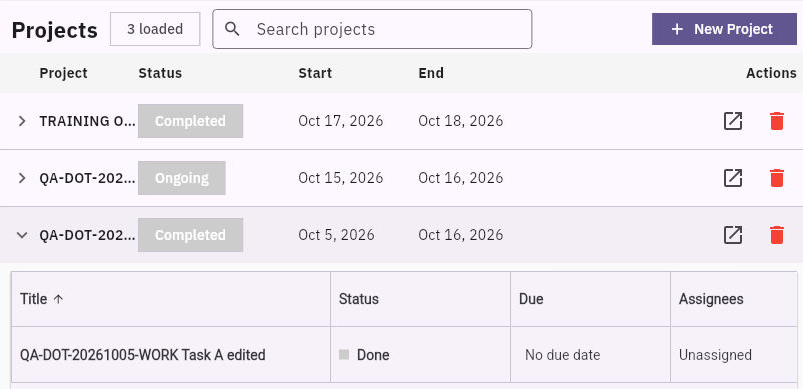
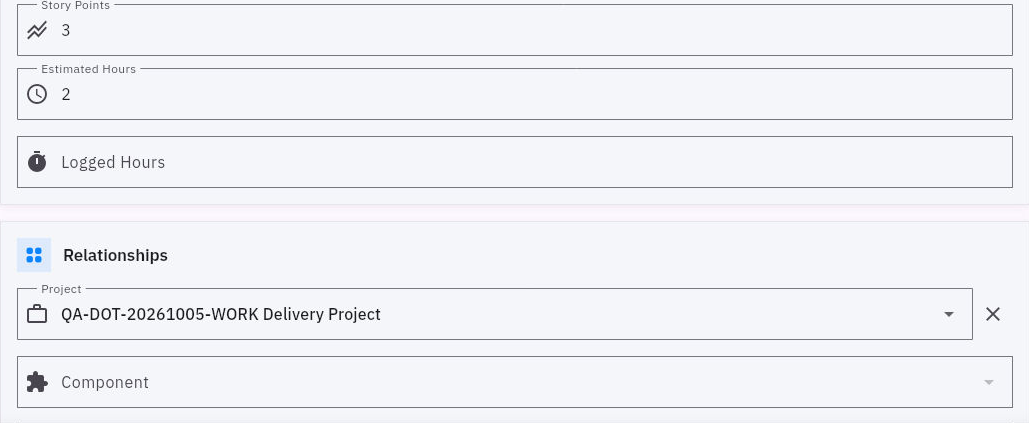
Record identity and a safe navigation check
A title prefix is only a retrieval aid. The full record name, selected Board and retained relationship are stronger checks. If a task is absent from the expanded project, first check the task's Project field and active filters; do not create another task merely to fill the list.
Practise the distinction
A project ends on Friday. Its task says No due date, Unassigned, and Done. What can you conclude?
The project has a Friday end date. The task has no recorded due date or assignee in that row and its reported state is Done. You cannot conclude that the task inherited Friday, that somebody accepted responsibility, or that the recipient accepted its output. Open the full task and supporting result before reporting delivery readiness.
You are ready to continue when you can name the Board, the project outcome, each task's output, and the relationship check that connects them. Reading and planning require no changes to shared records.
Turn what you learned into the way the team works.
Mark this lesson complete once the workflow exists in your workspace—not simply when you reach the bottom.