Meet course 01 — Understand rooms access and meeting records
Meet separates the place people can meet from the appointment, live conference and history left afterward. Understanding those records helps you choose the right destination and explain what actually happened. A saved appointment is not attendance, and a room link is not proof that the audience is appropriate.
Part of Meet module course
In this lesson
Meeting record types and room navigation
Meet separates the place people can meet from the appointment, live conference and history left afterward. Understanding those records helps you choose the right destination and explain what actually happened. A saved appointment is not attendance, and a room link is not proof that the audience is appropriate.
This course uses a small practice purpose: review two short sample labels and choose one with a reason. Use only an approved training room and audience. The screenshots show separate historical training records with identifiers already masked in the original images; they are examples of controls, not rooms to enter.
In this chapter
- Distinguish the four records
- Navigate to the intended room
- Check the audience independently of the room name
- Read privacy settings as settings
- Plan a useful outcome before booking time
- Practise the record distinction
Distinguish the four records
An appointment plans a date, interval, organiser, destination and guests. A room is a reusable meeting destination that can serve more than one appointment. A live session is an actual conference instance with connections and controls. History is the retained record of a session, potentially including start, duration, participant activity and recording information.
One appointment can have no session if nobody joins. Repeated or interrupted joining can create more than one session. Multiple connections can belong to the same person. Keep the room and session identity with any statement about attendance or completion.
Bookings concerns a booking or availability arrangement. A booking labelled Paused with a duration and calendar count does not establish that someone reserved a slot, received an invitation or attended. Do not substitute a booking label for the appointment or live-session result you need.
Navigate to the intended room
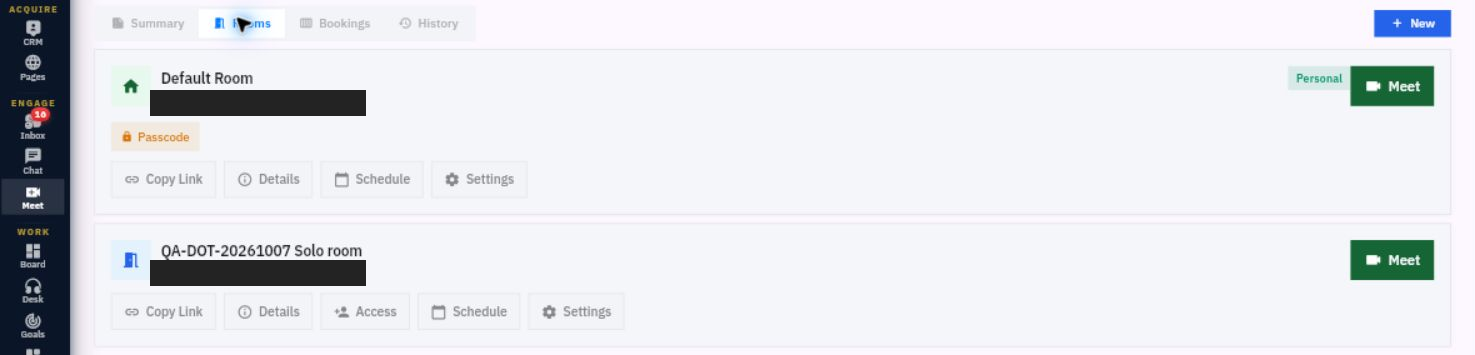
Check the workroom, open Meet from the left navigation, then identify Summary, Rooms, Bookings and History. In Rooms, find the exact full room name and identifier where shown. Similar names are not enough, especially when a default room and a separate team room coexist.
Audience and privacy choices
A room can expose Meet, Copy Link, Details, Access, Schedule and Settings. Default Room and a separately created room need not show identical controls. The absence of an Access button does not prove that everyone or nobody can enter.
Meet is an entry point, not evidence of an already active conference. Copy Link provides a route, not an invitation or permission grant. Schedule concerns appointments associated with the room. Read the exact record before taking an action, and do not distribute a room link merely to test copying.
Check the audience independently of the room name
Inspect Details and Access through the permitted view when you need to confirm the room and authorised members. Do not copy room credentials into training notes or screenshots. A room name containing Private is still only a name; use its actual access configuration and the intended audience.
Keep three lists separate: intended invitees, people authorised to enter the room, and identities actually connected in a live session. An organiser-only appointment can have zero guests while the reusable room still admits others. A person invited to the calendar event may not yet have the access needed to join.
For the label-review example, define the organiser, decision maker, reviewer and note taker. The organiser manages the plan; the decision maker chooses the option within the agreed scope; the reviewer provides an assessment; the note taker captures the outcome. These roles do not automatically establish the live host role or grant authority to change room settings.
Read privacy settings as settings
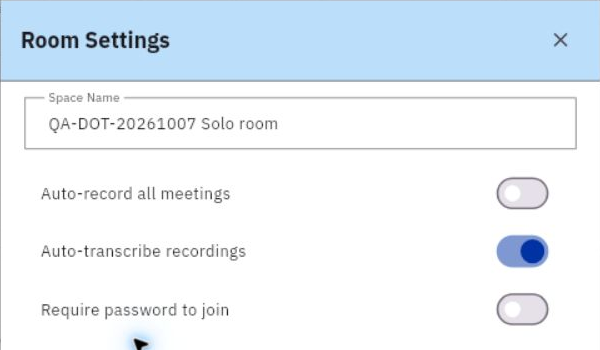
Room Settings includes Space Name, Auto-record all meetings, Auto-transcribe recordings and Require password to join in the illustrated form. Read the current values without changing them during inspection.
Purpose prerequisites and record distinctions
Automatic recording and transcription are different choices. Auto-record off does not prove that no later session action can record; auto-transcribe on does not prove a transcript exists. A password requirement is one safeguard, not a complete description of effective access.
If the meeting needs recording or transcription, agree purpose, audience, consent and retention through your organisation's process before enabling it. Do not treat a visible switch or a host role as sufficient authority. For a simple media-off rehearsal, leave recording, transcription and sharing unused rather than changing defaults to resemble a screenshot.
Close the settings inspection without saving when no change is intended. If an authorised change is needed, specify the exact setting and reason, preserve the previous state and verify the retained result separately from any session behaviour.
Plan a useful outcome before booking time
“Discuss labels” is too broad to tell you when the meeting is complete. “Choose Label A or B for the practice sample and record the reason” is checkable. Give participants the exact material and decision scope. Selecting a practice label does not approve a real print order or public publication.
Choose the minimum useful audience and a realistic interval. If one person only needs the final result, they may not need to join the whole discussion. Confirm that every required participant can access the material without exposing unnecessary information to the room.
Prepare any prerequisites: current room access, available service, approved media plan and a destination for the outcome. A local note is not automatically stored in Meet History or turned into a Board task. Decide where the agreed result belongs before the session starts.
Practise the record distinction
A room exists, an appointment says 30 minutes, a booking says Paused, and two live connections share the organiser's name. What is established? The room record and appointment plan are visible. The booking has its own state. Two connections are not yet two distinct people; verify identity before counting attendance.
Your expected result is a correctly identified room, an audience plan and an understanding of access/privacy controls. No invitation, live entry, working media or recorded outcome is established until those separate steps occur.
Turn what you learned into the way the team works.
Mark this lesson complete once the workflow exists in your workspace—not simply when you reach the bottom.