Chat course 02 — Send once and retrieve the exact message
Sending a request and obtaining a useful response are different results. This chapter shows the direct-message send and readback route, explains search and attention indicators, and helps you interpret a reply without extending it beyond what the person actually said.
Part of Chat module course
In this lesson
Deliberate sending and visible state
Sending a request and obtaining a useful response are different results. This chapter shows the direct-message send and readback route, explains search and attention indicators, and helps you interpret a reply without extending it beyond what the person actually said.
In this chapter
- Make one deliberate send
- Reopen the same conversation
- Use the search whose scope matches the question
- Reconcile an uncertain send before trying again
- Treat badges as attention state
- Interpret a response against the exact request
- Practise the uncertain-state decision
Make one deliberate send
Open the intended workroom and conversation, then Messages. Compare the header with the verified recipient. Review the complete approved text in the bottom Message... composer, including the material version and any proposed timing.
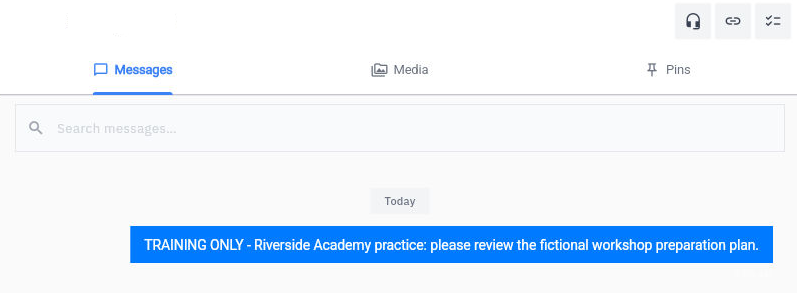
When sending is authorised, select the blue up-arrow once. The illustrated result is an outgoing blue bubble and a cleared composer. Read the actual text in the bubble. These are sender-side observations, not proof that another person received, read or accepted the request.
Retrieval searches uncertainty and replies
The short screenshot request asks for review but does not include the plan. Use it to recognise the retained-message view, not as a model of complete supporting material. Your own request should supply or provide verified access to the content described in the previous chapter.
Reopen the same conversation
Reload or leave and return through the normal Chat navigation. If Chat shows Select a conversation, choose the same verified person under Direct Messages. Compare the header and exact outgoing text, not merely the sidebar's shortened preview.
Read the timestamp as displayed. If no timezone is stated, do not convert it into an assumed timezone. A changed display or an unexplained date difference should be checked before concluding that there are duplicate messages.
A retained message establishes sender-side persistence. It does not establish the recipient's access to a separate file, a meaningful reply, review completion or accepted ownership. Report the state you can actually see: “The request remains in the intended conversation; the review response is still pending.”
Use the search whose scope matches the question
To find the conversation, use its sidebar entry or Search conversations. To look within an open conversation, inspect Search messages.... To find a new recipient, use + New → Search by name or email. These controls are not interchangeable.
A no-match conversation search is a result in the selected workroom and current list scope. It does not prove global deletion. A no-match recipient search for a sentence says nothing about whether that sentence was sent. If you know the conversation, reopen it directly before drawing a conclusion from search.
When a search returns a candidate, open it and compare the full identity and text. A familiar phrase can occur in more than one request or revision. Do not widen a search into unrelated private discussions merely because the first result was unclear.
Reconcile an uncertain send before trying again
If the composer remains busy or a connection issue appears after one send attempt, preserve the uncertainty. Reopen the original conversation and inspect the retained messages before considering a retry. A missing toast is not proof of failure, and repeated clicks can create duplicate requests.
If the text is retained once, do not resend simply because no reply has arrived. Follow the agreed response timing or establish an appropriate next check. Silence can mean the person has not reviewed the material; it is not a failed-send receipt.
If you cannot establish saved state, record the exact conversation, attempted text, time and visible error for support or the responsible owner. Do not contact another person or start a huddle to bypass the uncertainty.
Treat badges as attention state
An unread badge can disappear when you open a conversation. That change concerns the inspecting account's interface state, not proof that the other participant read your outgoing message. A notification count or bell likewise does not contain the review decision.
Notification, mute and mark-read controls can affect attention across more material. Inspect their actual scope before using them and do not treat them as an accountable reminder system by assumption. If a request needs follow-through, preserve an owner and check date in the appropriate work record.
Interpret a response against the exact request
Read what the person actually accepts. “I can review it later” offers review availability; it does not accept your proposed deadline or responsibility for revisions. “Looks good” may refer to an earlier version or only part of the content. Ask a focused clarification when version, scope or timing remains unclear.
Suppose the reviewer says, “The objective is clear, but the recap is missing.” The useful next action is to add the recap and return the revised version for review. The response does not appoint the reviewer to make the change. If a new version already contains the recap, confirm that the reviewer saw that version rather than treating the older finding as approval.
A refusal or changed availability is useful planning information. Preserve it and agree another plan with the appropriate owner. Do not rewrite a conditional offer into a commitment to keep the original deadline looking intact.
Use an actual supported reply route when available and authorised. A Messages tab alone does not establish threaded-reply, pin, edit or delete behaviour. Keep the request reference and version clear in the text rather than relying on an unverified message-action feature.
Practise the uncertain-state decision
You attempted one send, saw a connection issue, then searched a phrase in Search by name or email and found nothing. The correct next step is to reopen the original conversation and compare the exact text. Do not press send three more times.
Later, the message is retained, but the reviewer says they saw version 1 and can review version 2 only tomorrow. Report the retained request and the actual availability. Version-2 review remains open until the person has the correct material and supplies the requested response. The next chapter turns that remaining work into an accountable action.
Turn what you learned into the way the team works.
Mark this lesson complete once the workflow exists in your workspace—not simply when you reach the bottom.